Many months ago I set up the Facebook group UK Swagbucks and more. Currently we have 6000+ members, all helping each other to make the most of Get Paid To sites such as Swagbucks, Mintvine, Prolific, InstaGC and more.
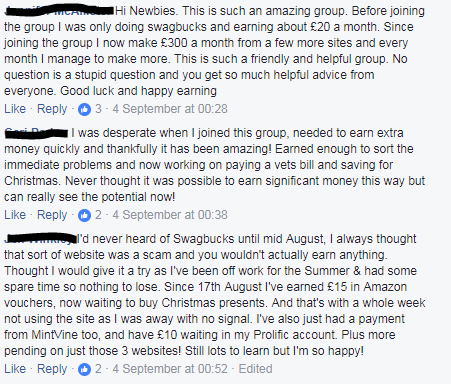
I love to see people tell us how the group has helped them, and in a lot of cases helped them make a life changing amount of money from these sites. An exaggeration? I really don't think so. Some people were making £5 every few weeks from sites such as Swagbucks and are now making a couple of hundred pounds a month. Some have found sites they never even knew existed before joining the group. Some use the group as a way to motivate and encourage themselves.
Don't take my word for it though, see what our members say:
So if you're looking for support, help, encouragement and hints, tips and ideas, come and join us now!
Showing posts with label Facebook. Show all posts
Sunday, 19 November 2017
Wednesday, 13 September 2017
Facebook minitip - Subscribe to notifications on a post
(Otherwise known as STOP TYPING "F" ON POSTS TO FOLLOW THEM!)
As an admin of many groups, one of my biggest bugbears is the habit people have of typing 'F' or 'Following' or tagging themselves on posts. Talking to other admin and members, I know this is a pet hate for a lot of people.
And the good news is, you don't have to do it!
All you need to do is subscribe to notifications on a post - you get notifications, the post doesn't get cluttered and the admin stays happy until the next flame war breaks out, so it's a win-win situation.
To subscribe to notifications, simply choose the post you want, click on the 3 dot menu on the top right hand corner:
As an admin of many groups, one of my biggest bugbears is the habit people have of typing 'F' or 'Following' or tagging themselves on posts. Talking to other admin and members, I know this is a pet hate for a lot of people.
And the good news is, you don't have to do it!
All you need to do is subscribe to notifications on a post - you get notifications, the post doesn't get cluttered and the admin stays happy until the next flame war breaks out, so it's a win-win situation.
To subscribe to notifications, simply choose the post you want, click on the 3 dot menu on the top right hand corner:
Choose 'Turn on notifications for this post':
You will receive future notifications of comments on the post without it being cluttered up and impossible to read!
Please think of your poor admins in future and subscribe to notifications instead of posting 'F'.
Head on over to https://www.instagc.com/codes/ and enter IGC-FBgroup_NoFsallowed for some extra points!
Sunday, 13 August 2017
Facebook minitip - How to search in a group
You may see the same questions being posted again and again on a large group: a good way to be sure your post isn't the 15th time that question has been posted today is to quickly search the group first. To do this on a laptop/PC, there is a search field on the left of the group:
To do this on the app, click the search icon (1st pic below) and ensure that you are 'searching within the group (2nd pic below):
Type in a few words that relate to your question:
- prolific payment
- vypr steers
- swago board
- getting referrals
- can't login on prolific
or whatever your question is, and see what the results are - the chances are that your question has not only been answered but expanded upon and you can join in the conversation in that thread.
There's not always someone around who can help, so this is usually the quickest way to find what you need.
If admin are around, they may well refer you to a previous post rather than typing everything out again
:)
Of course it may be that your question hasn't been asked before, or you can't find that it has, in which case post away! And in our Facebook Group we always want to hear your successes (and woes!) and about new apps and sites you find, and a hello if you're a new member.
Searching the group, rather than scrolling through it, may also introduce you to some posts you'd never even see too!
Happy searching
:)
Wednesday, 2 August 2017
Facebook minitip - searching a group
You may see the same questions being posted again and again on the Facebook group, a good way to be sure your post isn't the 15th time that question has been posted today is to quickly search the group first.
To do this on a laptop/PC, there is a search field on the left of the group (circled).
To do this on the app, click the search icon:
and ensure that you are 'searching within the group:
Type in a few words that relate to your question:
prolific payment
vypr steers
swago board
getting referrals
or whatever your question is
and see what the results are - the chances are that your question has not only been answered but expanded upon and you can join in the conversation in that thread.
There's not always someone around who can help, so this is usually the quickest way to find what you need.
If admin are around, they may well in future refer you to a previous post rather than typing everything out again :) Of course it may be that your question hasn't been asked before, or you can't find that it has, in which case post away! And we always want to hear your successes (and woes!) and about new apps and sites you find, and a hello if you're a new member.
Searching the group, rather than scrolling through it, may also introduce you to some posts you'd never even see too!
To do this on a laptop/PC, there is a search field on the left of the group (circled).
To do this on the app, click the search icon:
and ensure that you are 'searching within the group:
Type in a few words that relate to your question:
prolific payment
vypr steers
swago board
getting referrals
or whatever your question is
and see what the results are - the chances are that your question has not only been answered but expanded upon and you can join in the conversation in that thread.
There's not always someone around who can help, so this is usually the quickest way to find what you need.
If admin are around, they may well in future refer you to a previous post rather than typing everything out again :) Of course it may be that your question hasn't been asked before, or you can't find that it has, in which case post away! And we always want to hear your successes (and woes!) and about new apps and sites you find, and a hello if you're a new member.
Searching the group, rather than scrolling through it, may also introduce you to some posts you'd never even see too!
Facebook minitip - getting notifications of posts in groups
It seems that some people are missing out on notifications from the Facebook group - in order to be alerted every time a new post is put in the group, the best thing to do is edit your notification settings.
On the Facebook website, this is under 'notifications' at the top - simply tick 'all posts'.
On the Facebook app you need to click where it says 'joined', then 'edit notifications' and tick 'all posts'.
This will ensure you get alerted whenever a new post is put in the group.
Be aware there are a LOT of posts during the day so you may not want to see them all, but getting them all will mean you see swagbucks instant survey alerts, prolific survey alerts and any offers and promotions that are running on various sites / apps as soon as they are posted, rather than coming across them long after they've disappeared.
Not in the Facebook group? Come and join us!
Etiquette for getting referrals from Facebook groups
Just a quick reminder people, I know we all want to get referrals and one of the ways we do it is by posting in Facebook groups. However please be aware of he following if you do this:
1) Make sure that the group allows referral links - if you're not sure, ask an admin
2) Do not just 'drive by' spam your link in the group - if you're going to get points from a referral make sure you're also giving value to the group - participate and help others out for a while before even considering posting your links
3) Don't continually post your link in response to everything, even if it is related - people will get sick of seeing it and you'll end up getting complaints
4) If someone else has already posted their referral link on a post, back away - you didn't get this one, deal with it and move on - there will always be another post.
4a) Rather than posting every referral link you have on a post, pick ONE per post - it stops you looking desperate, doesn't overwhelm the original poster and gives other people a chance too. It could be a different site / app link each time, or the same one, up to you. I vary my links.
5) If there is a specific post / thread in a group for your app and admin has asked you to keep all posts on that topic in there, respect their wishes - it's their group and they've probably spent a lot of time building it up, it's a privilege, not a right to post in there.
You can get a lot of referrals from groups, but it is also easy to be kicked out, so have respect for the group you're in and you should be fine.
We welcome referral links in our Swagbucks Facebook group - come and join us!
1) Make sure that the group allows referral links - if you're not sure, ask an admin
2) Do not just 'drive by' spam your link in the group - if you're going to get points from a referral make sure you're also giving value to the group - participate and help others out for a while before even considering posting your links
3) Don't continually post your link in response to everything, even if it is related - people will get sick of seeing it and you'll end up getting complaints
4) If someone else has already posted their referral link on a post, back away - you didn't get this one, deal with it and move on - there will always be another post.
4a) Rather than posting every referral link you have on a post, pick ONE per post - it stops you looking desperate, doesn't overwhelm the original poster and gives other people a chance too. It could be a different site / app link each time, or the same one, up to you. I vary my links.
5) If there is a specific post / thread in a group for your app and admin has asked you to keep all posts on that topic in there, respect their wishes - it's their group and they've probably spent a lot of time building it up, it's a privilege, not a right to post in there.
You can get a lot of referrals from groups, but it is also easy to be kicked out, so have respect for the group you're in and you should be fine.
We welcome referral links in our Swagbucks Facebook group - come and join us!
Thursday, 30 December 2010
How to cook your Christmas turkey in the dishwasher and live to tell the tale
So, a week before Xmas my oven decides to stop working. All the local shops can't deliver a new one for 6 weeks, and I have 7 for Christmas dinner... aarrrgghhh!
So what did I do? I turned to trusty Twitter and Facebook for an answer. After posting out my plea, I received back many ideas:
Now, I admit that one of the other three options must be easier than the dishwasher suggestion, but come on - when have I backed down in the face of a challenge? The dishwasher it must be!
I told the family and they looked at me aghast. "Cook the turkey... in the dishwasher....?" All except Leigh, who said "What a great idea for a blog post!" (glad to see she inherited my nose for drama ;) )
And so, on Xmas morning we duly got out the turkey:
Well, to be honest it was a Chapon not a turkey as such, but it once had feathers and laid eggs so I'm not quibbling :)
The recipes I found online said to wrap it in stemaing bags - we didn't have any so we extra quadruple wrapped it in thick turkey foil while we were running the dishwasher through on empty to make sure it was clean.
Then into the dishwasher it went:
Here's the turkey in it's home for the next few hours:
It was a 3.5KG bird, so we put it through 4 cycles at the highest temperature (75 deg) - checking it after each cycle to see if it really was cooking. Leigh was on standby with chicken nuggets if it didn't, and Shaun mentioned many times how glad he was having fish that could be cooked in the microwave (wuss!)
After 4 cycles, we unwrapped it and took a look:
It was cooked! OK, it was a bit pale and anaemic looking, but nothing a quick blast in the microwave grill and copious amounts of gravy couldn't sort out.
Most importantly, it tasted yummy - moist, flavourful, and very definitely edible - with not a trace of detergent to be found ;)
The rest of the Christmas dinner was cooked in the halogen oven we borrowed, in pans and in the microwave, so it was a bit of a 'take it as you find it' affair, but all in all it worked well and everyone had a lovely Christmas dinner, as well as having created a bit of a talking point!
They tell me I'm brave to have tried it on such an important meal; there's a thin line between bravery and stupidity; I'm not sure which side I'm on LOL!
So for those of you who thought it couldn't be done - it can! For those of you who thought I wouldn't do it - I did! And for those of you who want to try it - do it! It really didn't take much longer than cooking the traditional way, and the end result was most pleasant.
What would you have done with your Christmas turkey if your oven broke a few days before Christmas?
So what did I do? I turned to trusty Twitter and Facebook for an answer. After posting out my plea, I received back many ideas:
- microwave it
- BBQ it
- deep fry it
- cook it in the dishwasher
Now, I admit that one of the other three options must be easier than the dishwasher suggestion, but come on - when have I backed down in the face of a challenge? The dishwasher it must be!
I told the family and they looked at me aghast. "Cook the turkey... in the dishwasher....?" All except Leigh, who said "What a great idea for a blog post!" (glad to see she inherited my nose for drama ;) )
And so, on Xmas morning we duly got out the turkey:
Well, to be honest it was a Chapon not a turkey as such, but it once had feathers and laid eggs so I'm not quibbling :)
The recipes I found online said to wrap it in stemaing bags - we didn't have any so we extra quadruple wrapped it in thick turkey foil while we were running the dishwasher through on empty to make sure it was clean.
Then into the dishwasher it went:
Here's the turkey in it's home for the next few hours:
It was a 3.5KG bird, so we put it through 4 cycles at the highest temperature (75 deg) - checking it after each cycle to see if it really was cooking. Leigh was on standby with chicken nuggets if it didn't, and Shaun mentioned many times how glad he was having fish that could be cooked in the microwave (wuss!)
After 4 cycles, we unwrapped it and took a look:
It was cooked! OK, it was a bit pale and anaemic looking, but nothing a quick blast in the microwave grill and copious amounts of gravy couldn't sort out.
Most importantly, it tasted yummy - moist, flavourful, and very definitely edible - with not a trace of detergent to be found ;)
The rest of the Christmas dinner was cooked in the halogen oven we borrowed, in pans and in the microwave, so it was a bit of a 'take it as you find it' affair, but all in all it worked well and everyone had a lovely Christmas dinner, as well as having created a bit of a talking point!
They tell me I'm brave to have tried it on such an important meal; there's a thin line between bravery and stupidity; I'm not sure which side I'm on LOL!
So for those of you who thought it couldn't be done - it can! For those of you who thought I wouldn't do it - I did! And for those of you who want to try it - do it! It really didn't take much longer than cooking the traditional way, and the end result was most pleasant.
What would you have done with your Christmas turkey if your oven broke a few days before Christmas?
Subscribe to:
Posts (Atom)