Showing posts with label apps. Show all posts

Wednesday, 29 November 2017

Making more space on the Vodafone Smart 7


Lots of people in our Facebook group are buying the Vodafone Smart First 7 Android phone in order to be able to get the 7 Swagbucks video apps and be able to earn  up to 140sb a day. It's also great if you want to be able to free up your main phone as the apps can take a few hours to run. At the time of writing the phone is just £14.99 so well worth it to make around £30 a month from the video apps.

I'll do a full review of this phone in a future blog post, but one of the main complaints is the lack of storage space on the phone, and with just 8gb of space, the seven Swagbucks apps pretty much max it out unless you delete some of the pre installed apps on the phone, which you really don't need (you won't want to use this phone as your main phone, trust me!)

But, thanks to the fab Bobbie Marie Kelloway in our Facebook group, we can show you a video of how to remove the things you don't need. Thanks Bobbie Marie! (You can show your appreciation to Bobbie Marie by joining Swagbucks via her referral link or thanking her in the group.)

Click here to view the video:


Once you've deleted all the extras, this really is a fab little phone for the price - I've managed to get all 7 Swagbucks apps, CC Cleaner, EngageMeTV app and still have room to spare.

Let us know how you got on in the Facebook group, and if you don't have the phone yet, buy it now to increase your earning power!

Wednesday, 13 September 2017

What are the video apps on Swagbucks and how do I get them?

Unfortunately for new Swagbucks users, one of the most profitable ways to make easy money on Swagbucks isn't in fact promoted well by them.

While surveys and offers are all very well, by far the easiest and best money maker on Swagbucks if you don't want to spend lots of time staring at a screen is the video apps.

There are 5 video apps for iPhone and 7 for Android.

You can get the Android ones here: Swagbucks apps for Android - this is what you are looking for:


You can get the iPhone ones here: Swagbucks apps for iPhone - this is what you are looking for:


For more info on running the apps, read this post. Remember, you can run the apps through their 10sb cycle twice per day - once between 8am and 2am, and then again through 2am - 8am, making a total of 140sb a day on Android and 100sb on iPhone.

Unfortunately the twice a day promotion has now finished, so you can only run the apps through once per day between 8am and 8pm - meaning 50sb on iPhone and 70sb on Android.

They do take a while to run, but (at least on Android for me) don't need 'babysitting' so it's easy Swagbucks for nothing. 

Don't want your phone tied up all day? I bought a cheap Android phone just to run the apps - it cost me £20 and has paid for itself in no time. 

Remember, read this post too for more info on the Swagbucks video apps.

And you can join Swagbucks here - on Android, if all you do is run the apps every day, that's £30 £15 a month! 

Join the Swagbucks group on Facebook for more hints and tips on Swagbucks.


.

Saturday, 2 September 2017

£15-20 a month for doing practically nothing? Swagbucks video apps


From a post in our Facebook group:

Ran all the Swagbucks video apps yesterday - 7 as I'm on Android - and as I awoke at 4.30am have time to run them all again before 8am. That's 140 swagbucks even if I get no bonus rounds :) iPhone users have 5 video apps, which is 100sb a day.

(Note: video apps can be run twice a day, once from 8am to 2am and then once again from 2am to 8am - I often get up at 5/6 so set them running again while I do my morning chores)

Unfortunately the twice a day promotion has now finished, so you can only run the apps through once per day between 8am and 8pm - meaning 50sb on iPhone and 70sb on Android.

So Android users - 140sb x 30 days = 4200 swagbucks a month, which based on a £5 giftcard being 700sb, is £30 a month even if you do nothing else.

And iPhone users - 100sb x 30 days = 3000 swagbucks a month, again based on a £5 giftcard being 700sb, that's almost £21.50 a month.

£30 / £21.50 a month for just leaving your phone on the side running? The spare phone I bought has paid for itself in less than a month http://amzn.to/2wkQT5P

Read this blog if you don't have or don't know about all the video apps -http://nikkersuk.blogspot.co.uk/2017/01/making-money-from-swagbucks-video-apps.html

Join Swagbucks here if you like the idea of £30 a month for doing practically nothing. I made £240 in August 2017!

Wednesday, 2 August 2017

Swagbucks minitip - video app welcome screen

A few people on our Facebook group have mentioned that the video apps  welcome screen tells them that they have earned 10sb but these aren't showing in their activity.

Here's an example of the welcome screen:


It's easy to see where the confusion arises, but all that screen is doing is telling you that last time you ran the app (01/08/2017 in this example) you earned 10sb. It's not extra sb and won't show up as 10sb in your activity tab, it's just a reminder that you have earned and the last date on which you did.

There's also a prompt to rate the app - it's up to you whether you do this or not but it's nice to give some feedback :)

If you don't want to give feedback, or have already done it, all you need to do is click the X in the top right hand corner and carry on with your app as usual :)

Not on Swagbucks? I made £240 in August 2017 alone! Join me now.


Thursday, 13 July 2017

Applike - Make money while you sleep!

This is a guest post from Daniel Smith, who is one of our Facebook group members - to get an invitation to Applike and benefit from what he earns, you can contact him via Facebook or email him at gbcritic@gmail.com

WHAT IS IT?

Applike is an incentive programme to entice users to play smartphone games (Android only at present, sorry iPhone users!) by giving you points for installing and playing. In the app, you are presented with a range of games, such as below.


You open the app, then you select which game to install and play, and then you are rewarded for playing. The longer you play, the more you earn.

Some games/apps reward you more than others – basically you want the ones with 4 stars (A LOT OF MCOINS). 3 stars are good (PLENTY OF MCOINS), but those 2 stars and below are barely worth the effort. The games/apps on offer are updated quite regularly so there should be plenty of good ones to choose from at any given time.


After a certain length of time playing a game though, it becomes futile to continue doing so. Take a look at the picture below.


You can see that in 5 minutes and 5 seconds time I'll earn 418 mCoins (the AppLike currency) playing Final Fantasy . During the initial installing and playing games, these rewards will be quite frequent. However, take notice of Kings of Avalon – my next reward of just 168 mCoins will come in almost 6 hours of gameplay! It's a personal choice of when to stop playing a game, but a general rule of thumb is that once a game passes around 2 hours per reward you should move on to the next one. You can simply uninstall the old game if you wish to avoid clutter on your phone.

NOT A GAMER? NO WORRIES!

You don't need to be a avid games player to make this work for you however. With a couple of minutes of set-up, you can simply leave this running and it earns you a handy passive income! Simply follow these steps:

·         Turn off sleep: All phones “go to sleep” if left idle for any length of time. Given that we'll be leaving the phone running the game (and some phones will take this as being idle) while we're off doing other things, we need to turn off the sleep function as this will pause your earnings.

There are two ways of doing this.
   In your phone, go to Settings > Display > Screen Timeout. Some phones will have this under Settings > Lock Screen > Sleep. Here you will be presented with a range of time options. The one you want is Keep Screen Turned On or Never Go To Sleep or similar. Some phones do not have the Never option though, so you'll have to do the second option (NB When you are finished using the app, it's best to turn the sleep function back on, as the screen is probably the main drain on battery power in smartphones)
   Turn on Stay Awake. This will set your phone to keep its screen on when you are charging it. First you have to turn on Developer Options. You can find out how to do this at http://www.greenbot.com/article/2457986/android/how-to-enable-developer-options-on-your-android-phone-or-tablet.html . Don't be too put off by this, it's a relatively simple process and doesn't affect your phone in any way – it just gives you access to a whole range of new options. Once this is enabled, you should find Developer Options in your main settings menu. Click on it and find Stay Awake and turn it on.

·         Start earning: Having carried out these steps, you can then start AppLike, choose the game, then walk away. You can also let this run overnight while the phone is plugged in, and have a nice little pile of mCoins waiting for you when you wake up :)

WHAT ARE THE PAYOUT OPTIONS?

AppLike pays out by PayPal. It's about 31,000 mCoins for £2.50. To put this in perspective, a newly installed, 4 star game (A LOT OF MCOINS) will typically earn around 10,000 mCoins if left to run overnight. Remember though that these earnings will decrease markedly the more you play a single game.

HOW CAN I BOOST MY EARNINGS?

The referral scheme is quite generous. In addition to earning 250 mCoins per friend you refer, you will also earn 25% of all mCoins they earn too. As an incentive to sign up, the referral also earns 25% of all mCoins their referrer makes as well. So it pays to help each other out!

INTERESTED?

If you join using a link I will send you when you contact me, you'll receive a 5555 mCoin starting bonus to get you off and running. Happy gaming!

This is a guest post from Daniel Smith, who is one of our Facebook group members - to get an invitation to Applike and benefit from what he earns, you can contact him via Facebook or email him at gbcritic@gmail.com


Want to write a How To guide for this blog? Come and let us know in the Facebook Group!


Friday, 6 January 2017

Making money from Swagbucks - video apps

If you're a Swagbucks addict like me, you've learned a few tips and tricks along the way (although I'm still learning all the time) to maximise your chances of earning Swagbucks.

One of the easiest that guarantees 60/70 sb per day is the video apps. I run a group on Facebook where members help each other out on various survey sites and receipt / cashback apps, and one of the questions we're asked the most is how we make 60/70 sb a day JUST on videos, so here's a quick and dirty how to.

*** Please note that you can now run the video apps twice per day - once after 8am and once between 2am and 8am, so if you're an early riser you could run them all again between 6 and 8am, for an extra 60/70sb ***

Unfortunately the twice a day promotion has now finished, so you can only run the apps through once per day between 8am and 8pm - meaning 50sb on iPhone and 70sb on Android.

Install the video apps 

First of all you need to have ALL of the video apps installed - in the UK these are shown below (please ignore the one called Amped 360, this is US only, instead look for SBTV (Android only) as your 6th video app and use the main Swagbucks app as your 7th), and you can find the links to them at http://www.swagbucks.com/mobile


Run the video apps IN FULL daily!

Sounds easy, but so many people miss this bit out. For each app you have to run between 10 and 14 videos to earn 2sb. What people don't seem to see is that once you've done that 2sb, you can then run the app again another 4 times (and sometimes once more for bonus sp) to earn a total of 10 sb from each app, making 60sb a day.

So, this is what I do after logging in to the app (not signing in, the login link is lower down and you log in with your Swagbucks account logins.

1) Start the app

I'm going to use EntertaiNow as my example, as it's always the first one I use. Open the app:


2) Choose the quickest videos

Using the menu top left (the 3 straight lines), open up the menu and choose 'short clips' (second option under 'channels'


3) Run the videos

This will give you screen similar to this:


Click on the first video and it will start running - clips in this section are generally under 30 seconds long (but see the power user tip at the end of this post!)

Your video will start running:


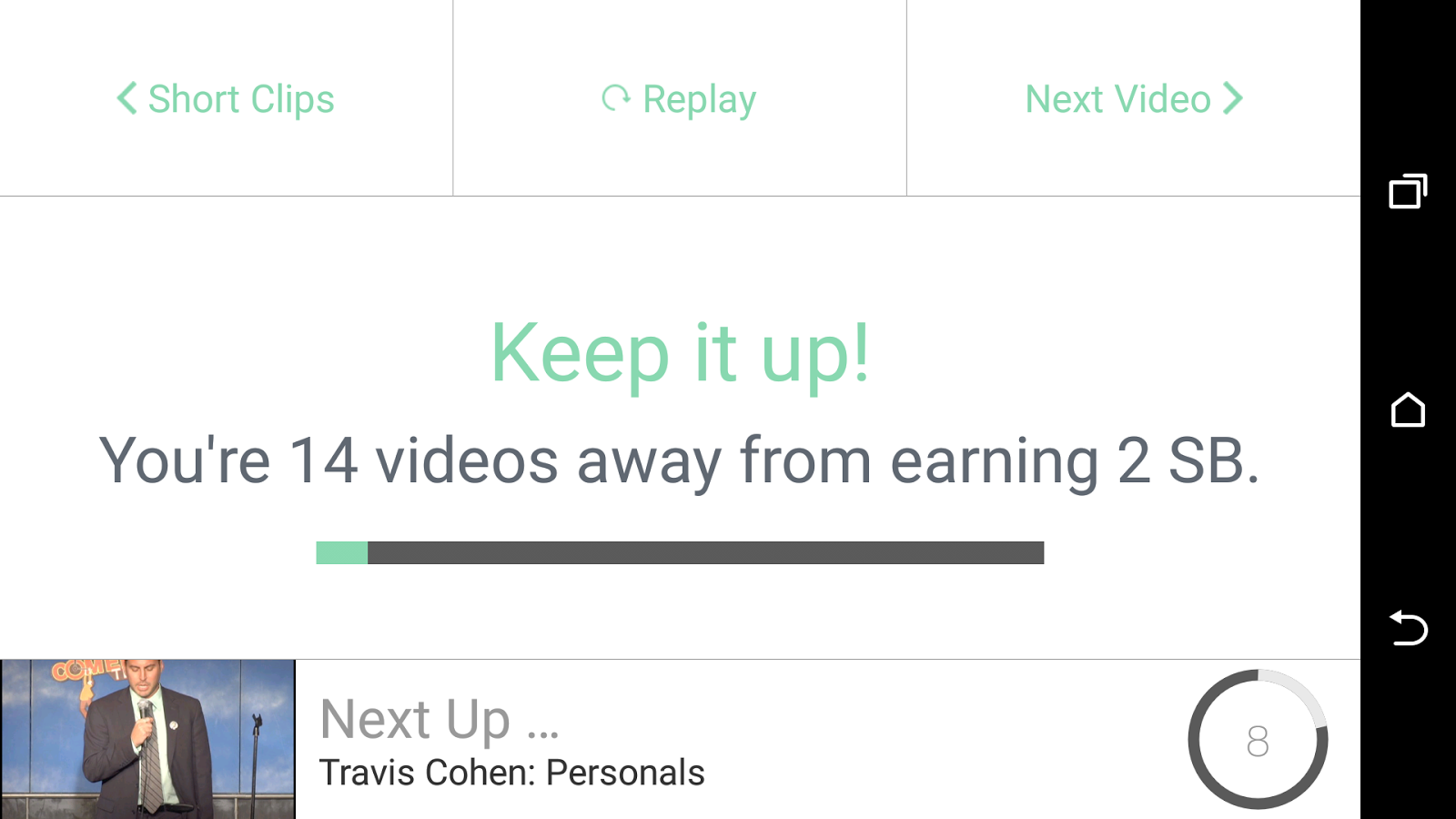
Once your video has run you'll see this screen:


(it may say fewer videos depending on how many are in the run)

Once all the videos in the cycle have run, you'll get an alert that you've got your 2 swagbucks:


This is where a lot of people stop, thinking they have done their bit on that app - BUT WAIT!

4) Do it all again (4 times!)

At the top right of that last screen is a 'next video' link - click on that and start the whole cycle again! You can run each app 5 times, giving 10sb in total - in some cases you will get a 6th chance so keep an eye out!

Don't forget - do this on all 6/7 apps, not just this one! That's 60/70sb for nothing.

Swagbucks video app power user tip!

If you don't want to hover over your phone while these apps are running, then you can just leave it on the side (i'd recommend plugged in as it does eat battery!) and let it run it's course.

HOWEVER, if you're watching TV or want to get it over and done with quickly, then this is how to do it:

4 second rule

Run the app as above, and run the first video. Let it run for 4 seconds and then click the 'done' link top right:


Move on quickly

You'll then get the usual screen, on this one, click 'next video' (top right) to move on to the next one without waiting:


Rinse and repeat!

At an average of 4 seconds per video, 2 seconds to move on, 14 videos per round and 5 rounds to run, you can have 10 sb in around 7 minutes. 

I hope this mini how to guide has helped someone out there, please consider commenting below if it has, and over on our Swagbucks, Mintvine, Shopprize and more Facebook Page. And of course, if you're not a Swagbucks member yet, come and join me