Showing posts with label videos. Show all posts

Wednesday, 13 September 2017

What are the video apps on Swagbucks and how do I get them?

Unfortunately for new Swagbucks users, one of the most profitable ways to make easy money on Swagbucks isn't in fact promoted well by them.

While surveys and offers are all very well, by far the easiest and best money maker on Swagbucks if you don't want to spend lots of time staring at a screen is the video apps.

There are 5 video apps for iPhone and 7 for Android.

You can get the Android ones here: Swagbucks apps for Android - this is what you are looking for:


You can get the iPhone ones here: Swagbucks apps for iPhone - this is what you are looking for:


For more info on running the apps, read this post. Remember, you can run the apps through their 10sb cycle twice per day - once between 8am and 2am, and then again through 2am - 8am, making a total of 140sb a day on Android and 100sb on iPhone.

Unfortunately the twice a day promotion has now finished, so you can only run the apps through once per day between 8am and 8pm - meaning 50sb on iPhone and 70sb on Android.

They do take a while to run, but (at least on Android for me) don't need 'babysitting' so it's easy Swagbucks for nothing. 

Don't want your phone tied up all day? I bought a cheap Android phone just to run the apps - it cost me £20 and has paid for itself in no time. 

Remember, read this post too for more info on the Swagbucks video apps.

And you can join Swagbucks here - on Android, if all you do is run the apps every day, that's £30 £15 a month! 

Join the Swagbucks group on Facebook for more hints and tips on Swagbucks.


.

Wednesday, 23 August 2017

Engageme.TV not working for Grabpoints? Try this!

This is a guest post from Rebekah Critchley, a member of our Facebook group dedicated to Swagbucks, Mintvine, Prolific and more - pop over to the group and thank her for taking the time to write it! It was written in response to a number of members saying they could not get Engageme.tv to work with Grabpoints.

So I am here to tell you today about a new work around for Engageme.tv on Grabpoints!

Lots of people are earning money for Grabpoints by signing in to Engageme.tv, connecting the two together and running videos on the Engageme.tv website (Nikki is writing a blog post about this at the moment that will be linked from here when it's finished).

A few people have found that this doesn't work well for them though so this guide is a work around should that fail.

If you are not yet on Grabpoints start here. If you are scroll down ...

There are 2 routes to sign up to Grabpoints. As of writing this Swagpoints has Grabpoints up for 256 points.

* Route 1 - Swagbucks home page ---> Discover page --->Revenue Universe:
   Scroll down until you see Grabpoints as can be seen below.


* Route 2 - Referral ---> Using a referral / invite code gives you a 500 point start on Grabpoints, so please feel free to use mine. Sign up via Grabpoints.com and here is my referral id: CIUU3V. Thank you so much if you do!

Ok so once you are signed in to Grabpoints  the screen will look like this:


On the left hand side click on Watch Videos:


This will bring up the following page:


Click on any one of the 3 videos that have 5 points next to them. This will then open up a window in engageme.tv.


On this screen you can see the points you are accumulating circled in Red and the video count in a orange rectangle:


The points will update on Grabpoints after every set of 5 you have accumulated. So at 5, 10, 15, 20 etc.

This can be see like this on your earn history.:


Occassionally you may encounter a problem with the video count not moving on. In this instance it is best to just go back to the watch video page and just choose a different one.

As you can see from my picture you can earn 5 points within 6-20 minutes or so but it does vary. I would say an average of 10 minutes to work through from 1-3 and then get awarded your 5 points.

Here is a print screen of my current status. This gives you a rough idea :-)


For those of you who may not be on Swagbucks yet it is fab! Lots of opportunities to earn through doing surveys, downloading apps, opening links, playing games, search the web aaaand the best watching videos! The points soon add up and you can cash out to Paypal and Amazon. Here is my referral should you wish to use it :-) : http://www.swagbucks.com/refer/swaguserRebC. If you do sign up through it thank you so much!

Hope that the guide helps and happy earning to you all! x

Wednesday, 16 August 2017

Running videos - is it worth the cost of the electricity?

This is a guest post by Jodie Webb, a member of our Facebook Group dedicated to Swagbucks, Mintvine, Prolific & more - come and join us and thank her!


Worried about how much electricity you're using, running videos on your phone, tablet or laptop at all hours of the day and night? It may not be costing you as much as you think!

Whether you're using Swagbucks, MintVine, GrabPoints, Perk TV, InstaGC, PrizeRebel, Earnably, EarnHoney or all of them and more, running videos is a great way to make passive income, but if you're not using your devices at the same time for anything else (or they wouldn't usually even be switched on) then it makes sense to ensure you are actually making a profit, as earnings can vary.

The amount of electricity used obviously varies by device and the cost of electricity varies by company and region - the majority of UK prices are currently around 10p to 13p per kWh (if you're paying more than that, it may be time to check out an energy comparison website and get switching to a better deal!) - so the below prices are a rough estimate.

A general rule of thumb would be between 0.25p and 0.75p to fully charge a tablet and around 0.1p to 0.2p to fully charge a phone. Just multiply that by however many times you have to charge it per day to get your daily cost and compare this with how much money you are making within the same time frame.

Used 1 full charge of your tablet to earn 50sb or 70sb from the Swagbucks mobile watch apps? Then it's probably cost you a lot less than 1p to earn 36p (50sb) or 50p (70sb). Use 1 full charge of your phone per day to run them and it could cost you around 1p for the entire week....or around 50p for the entire year! So the cost of electricity is nothing to worry about!

For laptops the usage can vary much more greatly, but you should be fine using an estimate of about 1.25p to 1.75p to fully charge it and then it really depends how quickly your battery depletes after that (or you may just leave it charging constantly). Depending on how demanding your usage is, an efficient MacBook could cost around 0.35p per hour of use, whereas a gaming laptop could cost up to 1p per hour of use. Desktops, being more powerful, can cost around 1p to 3p per hour of use.

Left your laptop running engageme.tv via Mintvine for 10 hours and earned 100 MV points? Then it's probably cost you less than 5p to earn about £80p in Amazon vouchers, so well worth it!

If you haven't joined Mintvine yet, then I highly recommend it, as in addition to doing surveys, I'm currently earning £1 to £2 per day running the engageme.tv videos that you can find under Adwall in the offers section. Join me on Mintvine now!

Wednesday, 2 August 2017

Swagbucks minitip - video app welcome screen

A few people on our Facebook group have mentioned that the video apps  welcome screen tells them that they have earned 10sb but these aren't showing in their activity.

Here's an example of the welcome screen:


It's easy to see where the confusion arises, but all that screen is doing is telling you that last time you ran the app (01/08/2017 in this example) you earned 10sb. It's not extra sb and won't show up as 10sb in your activity tab, it's just a reminder that you have earned and the last date on which you did.

There's also a prompt to rate the app - it's up to you whether you do this or not but it's nice to give some feedback :)

If you don't want to give feedback, or have already done it, all you need to do is click the X in the top right hand corner and carry on with your app as usual :)

Not on Swagbucks? I made £240 in August 2017 alone! Join me now.


Friday, 6 January 2017

Making money from Swagbucks - video apps

If you're a Swagbucks addict like me, you've learned a few tips and tricks along the way (although I'm still learning all the time) to maximise your chances of earning Swagbucks.

One of the easiest that guarantees 60/70 sb per day is the video apps. I run a group on Facebook where members help each other out on various survey sites and receipt / cashback apps, and one of the questions we're asked the most is how we make 60/70 sb a day JUST on videos, so here's a quick and dirty how to.

*** Please note that you can now run the video apps twice per day - once after 8am and once between 2am and 8am, so if you're an early riser you could run them all again between 6 and 8am, for an extra 60/70sb ***

Unfortunately the twice a day promotion has now finished, so you can only run the apps through once per day between 8am and 8pm - meaning 50sb on iPhone and 70sb on Android.

Install the video apps 

First of all you need to have ALL of the video apps installed - in the UK these are shown below (please ignore the one called Amped 360, this is US only, instead look for SBTV (Android only) as your 6th video app and use the main Swagbucks app as your 7th), and you can find the links to them at http://www.swagbucks.com/mobile


Run the video apps IN FULL daily!

Sounds easy, but so many people miss this bit out. For each app you have to run between 10 and 14 videos to earn 2sb. What people don't seem to see is that once you've done that 2sb, you can then run the app again another 4 times (and sometimes once more for bonus sp) to earn a total of 10 sb from each app, making 60sb a day.

So, this is what I do after logging in to the app (not signing in, the login link is lower down and you log in with your Swagbucks account logins.

1) Start the app

I'm going to use EntertaiNow as my example, as it's always the first one I use. Open the app:


2) Choose the quickest videos

Using the menu top left (the 3 straight lines), open up the menu and choose 'short clips' (second option under 'channels'


3) Run the videos

This will give you screen similar to this:


Click on the first video and it will start running - clips in this section are generally under 30 seconds long (but see the power user tip at the end of this post!)

Your video will start running:


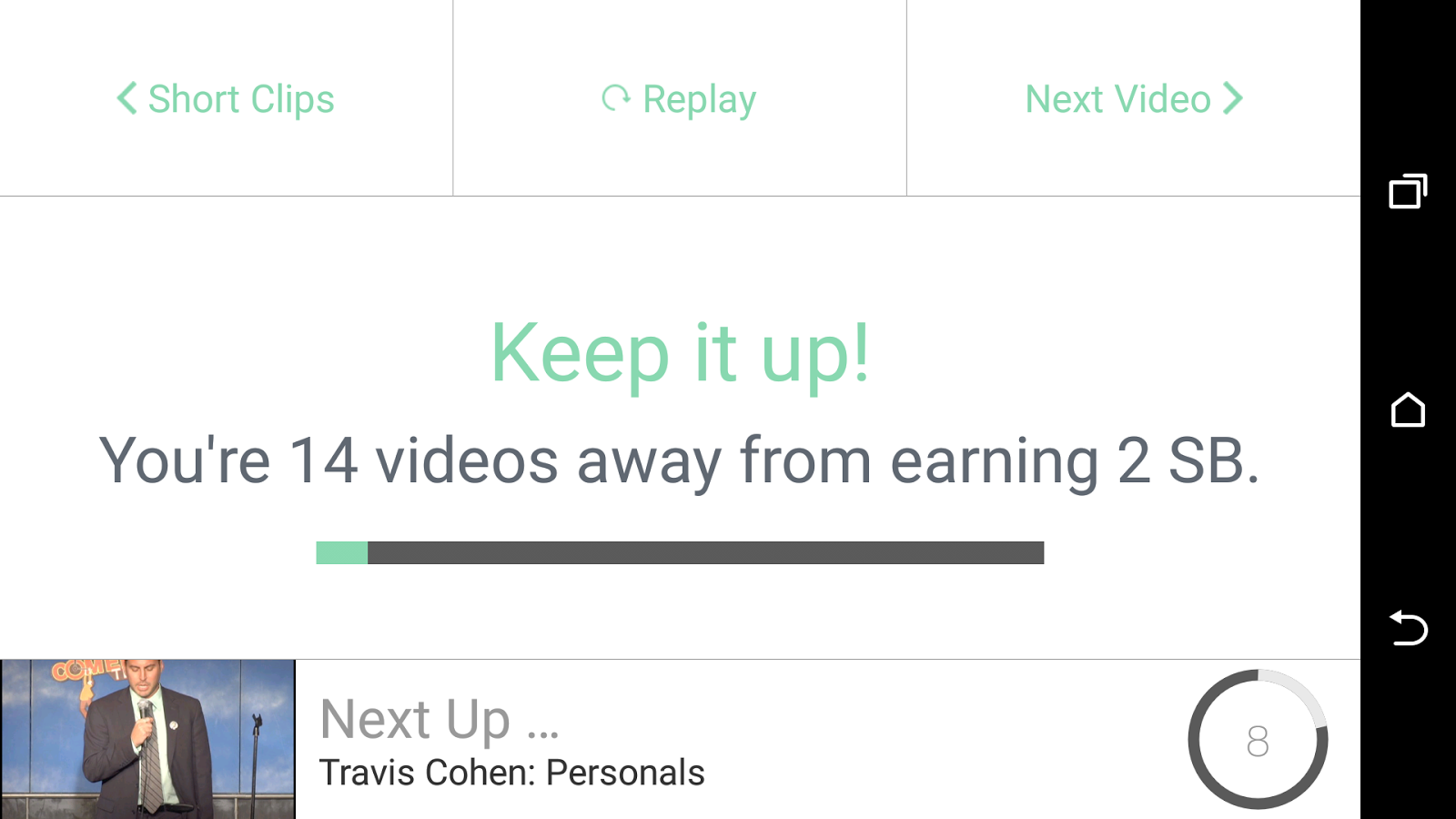
Once your video has run you'll see this screen:


(it may say fewer videos depending on how many are in the run)

Once all the videos in the cycle have run, you'll get an alert that you've got your 2 swagbucks:


This is where a lot of people stop, thinking they have done their bit on that app - BUT WAIT!

4) Do it all again (4 times!)

At the top right of that last screen is a 'next video' link - click on that and start the whole cycle again! You can run each app 5 times, giving 10sb in total - in some cases you will get a 6th chance so keep an eye out!

Don't forget - do this on all 6/7 apps, not just this one! That's 60/70sb for nothing.

Swagbucks video app power user tip!

If you don't want to hover over your phone while these apps are running, then you can just leave it on the side (i'd recommend plugged in as it does eat battery!) and let it run it's course.

HOWEVER, if you're watching TV or want to get it over and done with quickly, then this is how to do it:

4 second rule

Run the app as above, and run the first video. Let it run for 4 seconds and then click the 'done' link top right:


Move on quickly

You'll then get the usual screen, on this one, click 'next video' (top right) to move on to the next one without waiting:


Rinse and repeat!

At an average of 4 seconds per video, 2 seconds to move on, 14 videos per round and 5 rounds to run, you can have 10 sb in around 7 minutes. 

I hope this mini how to guide has helped someone out there, please consider commenting below if it has, and over on our Swagbucks, Mintvine, Shopprize and more Facebook Page. And of course, if you're not a Swagbucks member yet, come and join me!