Showing posts with label money. Show all posts

Friday, 21 September 2018

Citizen Me - make money with an app on your phone!

With Summer well and truly here, GPT (Get Paid To) earnings on survey and offer sites can wain. The kids are at home, we’re all going on holiday and sometimes it’s just too much effort.
This is where GPT earning apps come in to their own – most apps take up little time, little effort and can be done while you’re on the go. Whether standing in the supermarket queue, sunbathing on the beach, watching TV with the kids or one of the myriad of other things you’re going to be doing this summer, GPT earning apps make sure that you can still be earning when you can’t do long surveys or spend chunks of time on a site.
In this post I’d like to talk about CitizenMe

What is CitizenMe?

CitizenMe is an Android or iOS app that gives you mini quizzes to help you learn more about yourself and your community, whilst earning a little money on the side. 

Where can I get CitizenMe?

You can get it on Android here
You can get it for iOS here

What do I have to do?

Once you sign up, and give some basic information, all you have to do is answer the quizzes that pop up.
Most quizzes consist of between 1 and 5 questions, but if there are more, you are told in advance and can decide whether or not to do them.
At the end of a quiz you will see the results and how you compare with others who have done the same quiz, and be given the opportunity to share on social media.

Are all quizzes paid?

No, there are a few types of quiz. 
Light blue ones are just for fun
Darker blue and purple ones aren’t paid, but learn more about you, which in turn means you could get more paying quizzes.
Red quizzes donate to charity.
The ones to look out for are the green ones – they will earn you a few pence.
Just click on the quiz, answer the questions and Bob’s your uncle!

How do I cashout on CitizenMe?

Well, you don’t, as such! When you sign up, CitizenMe asks for your Paypal details, and every time you complete a paid quiz, the money is sent instantly to your Paypal account.

How much can I earn on CitizenMe?

It very much depends on the info you share to be honest. The more you share, the more likely you are to get paying quizzes.
Quizzes tend to pay anything from a few pence to upwards of £1, but you have to be quick! The beauty of the app is that the quizzes take seconds to do and you’re paid immediately. If you manage to get most quizzes, this should net you about £2-5 a month, we reckon – it’s not going to make you a millionaire, but for the time it takes, it’s worth adding to your routine.

What do CitizenMe do with my data?

Citizenme say: We do not lease, sell or share any of your personal information with third parties. All of your personal data stays securely on your own smartphone. Only you can choose to share your data and only with your explicit permission. When you do so, it is anonymised by default. 
Basically what this means is that your data is not stored on their servers, but on your phone, and the only time it leaves there is when you do a quiz. When the data leaves your phone it is anonymised, which means it cannot be attributed to you personally, just your dataset. In short, nothing to worry about!

Is there a referral scheme?

Not currently, but we understand that there will be one introduced in the coming months

How can I contact CitizenMe?

Or via the app itself 

I have another question you haven’t answered!

Sorry about that, why not come and ask in our Facebook group where over 9,000 members use sites and apps such as CitizenMe?

Remind me again, how do I get CitizenMe?

You can get it on Android here
You can get it for iOS here

Thursday, 1 March 2018

Earnings roundup - Feb 2018

So, can you make money from survey and GPT sites? Each month I'll show you what I made the previous month, explain a little about the sites and apps I used, and keep a running total for the year. As this only started in February, you'll have to trust me that in January I made £327.88.

So, February 2018

I had been hoping that February would be a little better than January, as January was a VERY quiet month. Unfortunately a combination of family stuff, work / clients being very intensive, and a general lack of adverts on a lot of the video sites I use, meant it was even quieter than usual.

I tried to stick to my planned 1.5 hours a day, but for at least 10 days in February I couldn't even spare that, so I wasn't holding out much hope for much more than about £50. 

Let's see how things went...

Swagbucks


Swagbucks is my favourite site, probably because it was the first one I joined, and it'sthe one I make the most from.. It's mainly video apps, surveys, clicks, offers, trials etc. If their advertisers aren't paying much (and Jan and Feb are notoriously quiet) then there's not always a lot to do. I don't like doing surveys, so I rely on the video apps (which I can leave running whileI do other things) and other parts of the site to earn. Some days in Feb I didn't even get the chance to do that, so I was pleasantly surprised to see that I had managed to cashout £105 in February.


You can sign up to Swagbucks by clicking here. Read how you can get a bonus in March, then sign up using your email address, not the Facebook option.


InstaGC


I love InstaGC because there's a lot of opportunity for passive earnings (ie not having to do anything). I mainly run videos on here, there are 4 streams of videos to run and I run them all as often as I can. There are also surveys and offers, the same as Swagbucks, and a lot of the surveys are short, which I like. 

Again, it was quiet as there weren't many advertisementson the video streams and I had problems running a couple, so I didn't make as much as I usually do. Add to that the days off and I was happy to have cashed out $50 to Paypal, which worked out at £34.91


Yu can sign up to InstaGC by clicking here - if you do, it's worth dropping me a line on Facebook as it can be a little confusing at first and I can help you to get started.

Branded Surveys 

Branded Surveys, which used to be called Mintvine is a bit of an acquired taste these days but I kind of like it. I don't earn as much as I used to from it, but I stick with it because it pays for my Pizza Express addiction.

Like the others, it's surveys and offers - no video options anymore, which means actually DOING something on the site, which is one reasonI don't make as much these days.

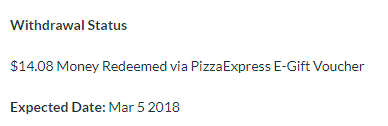
In February I cashed out the £15 voucher you see above and another £10, which will clear soon. You can also cash out to Paypal, Tesco, Amazon etc, but I use it purely for Pizza Express for a nice treat every month.


You can sign up to Branded Surveys by clicking here - new members tend to get some good surveys for big points and little effort so definitely worthwhile.

Prolific Academic 

Prolific is purely a survey site, but as it's an Academic site the surveys tend to be really interesting and sometimes even fun. There's sometimes an option to earn bonuses, but in general they're one of the better paying survey sites. The only dowside of this site is that they don't email you when a survey is available, so you have to check the site regularly and as such it's easy to miss out on surveys / studies. Payment ranges from pence per study to pounds - in the past I've done stuides worth £16, £20 and more.

Newbies on here tend to get a lot of studies - in my first month I made over £100. This tapers off after a while, and that, combined with the fact that I didn't have a lot of time to be checking in February meant that I only made £18.10 - must try harder in March!


You can sign up to Prolific by clicking here. Be sure to complete all of the prescreening questions and to check in often.

Minor Earners


I have a few phone apps that I also use that take up very little time, and I can do while in the car (as a passenger!), watching TV, waiting for the kettle to boil, in queues in shops etc. 

CitizenMe

Short (4 or 5 questions usually) surveys that pay small amounts immediatelyto Paypal. You'll have to search your app store to find it and it's never going to make you rich but every little helps! Feb earnings - £0.72


Vypr

A great little app that gives you 'steers' every so often. These are mainly about food and are usually just 1 question at a time. Cashout is at £5 to Paypal. Another one that won't make you rich but it's an extra fiver every month or so, so I keep it. Feb earnings £5


You can find links to Vypr by clicking here.

Attapoll

Another app that sends out surveys every couple of days - there seem to have been quite a few in Feb so I was able to cashout £5.15. They pay to Paypal within a couple of hours.


You can get Attapoll by clicking here - it's pretty straightforward and will alert you when there is a survey available.


Gfk Media

This is a browser add on that pays me £10 every 6 weeks or so per device I have it on. Well, DID as it's now been discontinued. I gained another £10 from it this month - it should have been more but I had deactivated it on a few of my devices. It is being replaced by Nicequest, which I'll be checking out ready for next month.

Total

So that means that February 2018 came in at £203.73 - not that great, but not that bad either. Hopefully March will give me more passive earnings and a higher total.

That's £327.88 in January and £203.73 in February, making a running total of £531.61 so far this year.

Hopefully March will be better!

*Please note that most of the links in this post are referral links and therefore I will receive benefits if you join via my link. That said, so will you in some cases, and it's in my interests to help you make the most of them, so feel free to PM me on Facebook anytime.


Saturday, 25 March 2017

Swagbucks - paying Mastercard into Paypal to make more of your Swagbucks

*** STOP PRESS! After feedback from members of our Facebook group (thanks Kelly!) it seems that there are no longer any fees to pay Mastercard into Paypal if you add the Mastercard as a payment card on one Paypal account and then pay using it into your main Paypal account. So you need 2 Paypal accounts with different email addresses***

If you're a Swagbucks member, you'll know that at the time of writing it costs 800 swagbucks to get a £5 Paypal voucher. However, due to the current sale, it only costs 700 swagbucks to get a £5 virtual Mastercard.

So it makes sense to get a Mastercard, right? But what do do if you want to put the money in your Paypal account? Well thankfully, it's easy :)

Once your Mastercard details come through from Swagbucks, you'll need to verify it with your name and address.

Once you've done that you'll be given the details of the card (I've covered my details up in the pic below)


Now, to add this to your Paypal account you'll need:

1) A Paypal account
2) An email address that is different to your Paypal email address

You can set up a second email address through Gmail or something quite easily.

Now, log into your Paypal account and find 'Request Money' - depending on whether you have on older or newer, personal or business Paypal account will depend on where you find this.

Mine is in Money --> Send or Request Money:

Then click on request money from a friend or customer (or similar):


On the next screen input your second email address and the amount you want to request.

Log out of Paypal.

Now, go to your second email account and pick up the email that will have been sent:


Open up the email and click on Pay Now:


Now, and this is the important bit - DO NOT LOG IN TO YOUR PAYPAL ACCOUNT!

Click on 'Pay without a Paypal Account'


This will take you to a screen where you can choose to pay via credit / debit card - input your Mastercard details and pay the request.

Upon logging back in to your Paypal account, you should now see your payment:

Note that there is a fee of 37p per five pounds (if anyone knows a way around this please let me know) but, bearing in mind you've saved 100 swagbucks which is about £90p, you're still a few pence up :)

*** STOP PRESS! After feedback from members of our Facebook group (thanks Kelly!) it seems that there are no longer any fees to pay Mastercard into Paypal if you add the Mastercard as a payment card on one Paypal account and then pay using it into your main Paypal account. So you need 2 Paypal accounts with different email addresses***


Want more help like this? Come and join our Swagbucks / Mintvine / Prolific Facebook group!

If this has helped you, please share with your Swagbucks friends!

Thursday, 2 March 2017

How to reach your second goal on Swagbucks with very little effort and minimal risk

If you're a Swagbucks user, you're probably familiar with the 'Daily Goal' aspect of the site. This is shown at the top of your screen when you're on the desktop version of the site, and has a 'first' daily goal and a 'second' daily goal.

The first is usually fairly low - if you're new it could be as low as 40 or 50 swagbucks - and the second a higher target. The more you do on Swagbucks, the higher your second daily goal will be, but the first is usually easily achievable.

For example, today my first goal was 105 - and this is my second:


My second goal is 800, and if I get it, I'll get a 76sb bonus at the end of the month. Reaching goal for 7 days in a row adds on an extra 25sb bonus, 14 days a 100sb bonus, 28 days a 200sb bonus and 28 days a whopping 300sb bonus, so it's well worth reaching at least your first daily goal every day. 

I've been on Swagbucks since 2012 (although only using seriously since 2016), so a lot of the offers in Discovery that pay big swagbucks are no longer available to me, or I have to spend in order to get them and I don't like spending money to earn money ;) (There are exceptions to this rule and I'll post about this another time)

However, thanks to the Swagbucks and other money making apps / sites group that I set up on Facebook, I've come across a great tip for making goal fairly quickly, fairly easily and with very little risk.

Make Swagstakes work for you

Swagstakes is Swagbucks' mini gambling area on the site. Usually I ignore it, as I cling to my SB fairly hard :)

But, there is a fairly low risk way to wager swagbucks - you won't increase your sb total in the examples I'm going to use, but you can reach goals and snag those all important bonuses.

I'm going to walk you through the process right here.

First, pop on over to Swagstakes - it's in the left hand menu under 'Contests' or you could click on http://www.swagbucks.com/swagstakes if you're already logged in:


Once in the Swagstakes screen, you'll see many options - my advice is to ignore them all - it's tempting, but that's not what we're concentrating on here.

Click on the link that says 'Limited Entries' (I've bookmarked the page which is at http://www.swagbucks.com/s/category/-1/Limited-Entries ):


On the next screen you're looking for the entries that only have 3 chances available - this means that only three entries are accepted, and then the prize is drawn. I've circled (kind of!) the 2 that I use - one is to win 50sb and one to win 100sb.


Let's take the 50sb game here - each entry costs 25sb. If you buy one entry, you have a 1 in 3 chance of winning. If you win you have spent 25sb and gained 50, which is good. HOWEVER if you snag 2 entries, one after the other, you have a 2 in 3 chance of winning. You'll spend 50 sb and if you win, gain 50sb, so no overall gain in your total SB, but the 50 WILL count towards your daily total.

So, let's grab one entry:


Snag the first entry, which will ask you to confirm and then take you to your swagstakes screen where your entry will show:


Click on that entry to snag another entry:


The key here is to be quick and get two out of the three before anyone else jumps in. Once you have 2 entries, just wait:


Many time you will win: 


You can do this multiple times to build up your daily goal total.

**Edited to add** Here's my final total for today:


****HOWEVER PLEASE BEWARE****

You will not win every time. Sometimes, even though the odds are in your favour, you WILL lose. See my luck so far today below:


I'm 200sb up on my daily total today but 105sb down on my overall total because I lost twice. I'm ok with that because my second daily goal bonus will be worth 76sb at the end of the month, plus hopefully the 300 monthly master when I get 28 consecutive daily goals.

Some days I'm luckier than others, and I only do this when I have a few sb i'm willing to lose. When I've lost 3 times, I stop. Most days I break even on the overall total and reach second goal.

I don't do this every day, but some days it really does help me reach goal.


It's not for the faint hearted, but if you need a few extra SB to reach either goal, it might be worth risking a few SB to see if it can work for you.

Not a Swagbucks member? I made £123 in February 2016 with very little effort, you could too. Join now. And don't forget to join our Facebook group too!

Any questions? Ask in the Facebook group and we'll all be happy to help!

You might also like to read how to make 60sb a day from Swagbucks video apps while you work / sleep / do housework / play

Thursday, 16 February 2017

How do I make money from Mintvine?

I'm a massive fan of Mintvine. It's kind of a rival to Swagbucks, but a lot easier to navigate and there seem to be more surveys available at any one time.

I'm going to presume that you're completely capable of signing up and following the instructions for the initial 'getting to know you' questions (plus I'm being lazy), and that you now have an account and are not sure what to do.

I'll share with you the things that I do if I'm focused enough, each day.

Daily Survey

The easiest way to earn 5 points every day is to do the Daily Survey. Scroll down and you will be given the option to take part (I've done mine already which is why it's already filled in)


There's a new one each day and that's 5 points per day. Time taken: 5 seconds.

Survey Street

The first thing you see, top right of your screen or via the menu, is Survey Street.


The steps are easy:

1) Click on 'Go Take My First Survey' - you'll see something like this:


Scroll down and you'll see you have to agree to a few things before you can take a survey:


You have to tick those 3 boxes before you can proceed

2) Take the survey:


You won't necessarily see the exact screen I have above, but you'll be on your way to your first survey.

Things to know:

  • You may not qualify for every survey 
  • You may have to answer a few questions before you find out you don't qualify
  • Different surveys have different times and different values
You'll be offered other surveys once you've finished one - it's up to you if you do another one or move on to:

Rewards Road

Underneath Survey Street  you should see Rewards Road:


Basically it's just another version of surveys, but each one of these is worth 70 points each. You don't have to agree to anything like before, you just do the surveys.

You'll see this screen once you click on 'Go to Rewards Road':


Click on 'Continue' and you'll get to a screen like this with a few qualifying questions:


Answer the questions and you'll be offered a survey:


As before, you could be disqualified after answering a few questions. Unfortunately that's just the way it is.

These are the main ways to get points on Mintvine. I'll cover some other ways in future blog posts.

Things to note:

  • Points 'pend' for 2 weeks, so while they will show as part of your total, you won't be able to withdraw them until they're approved.
  • Mininum cashout for Mintvine is 1000 points.
  • 1000 points equals $10
  • Once you have 1000 points, you can cashout any amount beyond that, so for example 1264 points will get you $12.64
  • HOWEVER, 1000 points is just £7.49 via Paypal, but £13.10 on Amazon so Amazon cashout is MUCH better!
  • Mintvine takes around 5 days from requesting a cashout to receiving it
If you're not on Mintvine already I'd highly recommend it - unlike Swagbucks and other survey sites there seem to be a LOT more surveys available and if you can qualify for them then the points add up pretty quickly.

If you have any Mintvine questions, post them in the comments below and I'll answer them in future blog posts, or pop over to our Facebook group and join.

Friday, 6 January 2017

Making money from Swagbucks - video apps

If you're a Swagbucks addict like me, you've learned a few tips and tricks along the way (although I'm still learning all the time) to maximise your chances of earning Swagbucks.

One of the easiest that guarantees 60/70 sb per day is the video apps. I run a group on Facebook where members help each other out on various survey sites and receipt / cashback apps, and one of the questions we're asked the most is how we make 60/70 sb a day JUST on videos, so here's a quick and dirty how to.

*** Please note that you can now run the video apps twice per day - once after 8am and once between 2am and 8am, so if you're an early riser you could run them all again between 6 and 8am, for an extra 60/70sb ***

Unfortunately the twice a day promotion has now finished, so you can only run the apps through once per day between 8am and 8pm - meaning 50sb on iPhone and 70sb on Android.

Install the video apps 

First of all you need to have ALL of the video apps installed - in the UK these are shown below (please ignore the one called Amped 360, this is US only, instead look for SBTV (Android only) as your 6th video app and use the main Swagbucks app as your 7th), and you can find the links to them at http://www.swagbucks.com/mobile


Run the video apps IN FULL daily!

Sounds easy, but so many people miss this bit out. For each app you have to run between 10 and 14 videos to earn 2sb. What people don't seem to see is that once you've done that 2sb, you can then run the app again another 4 times (and sometimes once more for bonus sp) to earn a total of 10 sb from each app, making 60sb a day.

So, this is what I do after logging in to the app (not signing in, the login link is lower down and you log in with your Swagbucks account logins.

1) Start the app

I'm going to use EntertaiNow as my example, as it's always the first one I use. Open the app:


2) Choose the quickest videos

Using the menu top left (the 3 straight lines), open up the menu and choose 'short clips' (second option under 'channels'


3) Run the videos

This will give you screen similar to this:


Click on the first video and it will start running - clips in this section are generally under 30 seconds long (but see the power user tip at the end of this post!)

Your video will start running:


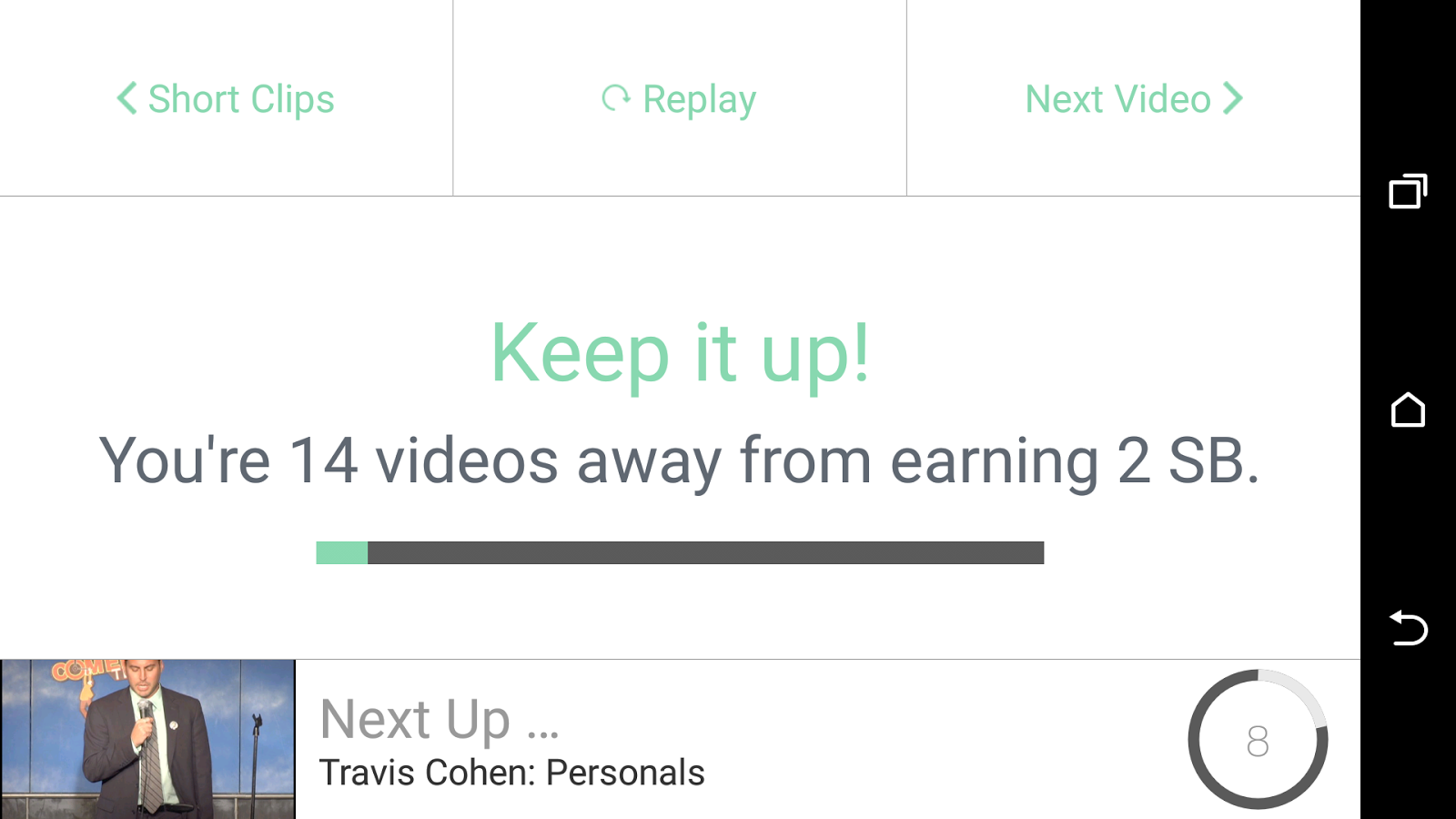
Once your video has run you'll see this screen:


(it may say fewer videos depending on how many are in the run)

Once all the videos in the cycle have run, you'll get an alert that you've got your 2 swagbucks:


This is where a lot of people stop, thinking they have done their bit on that app - BUT WAIT!

4) Do it all again (4 times!)

At the top right of that last screen is a 'next video' link - click on that and start the whole cycle again! You can run each app 5 times, giving 10sb in total - in some cases you will get a 6th chance so keep an eye out!

Don't forget - do this on all 6/7 apps, not just this one! That's 60/70sb for nothing.

Swagbucks video app power user tip!

If you don't want to hover over your phone while these apps are running, then you can just leave it on the side (i'd recommend plugged in as it does eat battery!) and let it run it's course.

HOWEVER, if you're watching TV or want to get it over and done with quickly, then this is how to do it:

4 second rule

Run the app as above, and run the first video. Let it run for 4 seconds and then click the 'done' link top right:


Move on quickly

You'll then get the usual screen, on this one, click 'next video' (top right) to move on to the next one without waiting:


Rinse and repeat!

At an average of 4 seconds per video, 2 seconds to move on, 14 videos per round and 5 rounds to run, you can have 10 sb in around 7 minutes. 

I hope this mini how to guide has helped someone out there, please consider commenting below if it has, and over on our Swagbucks, Mintvine, Shopprize and more Facebook Page. And of course, if you're not a Swagbucks member yet, come and join me