Showing posts with label surveys. Show all posts

Thursday, 1 November 2018

Get 500 bonus points when you sign up for Swagbucks in November!


All throughout November you can earn large bonuses from Swagbucks

Swagbucks is a rewards site where you earn points (called SB) for things you're probably doing online already, like searching, watching videos, discovering deals, and taking surveys. Then you take those points and exchange them for gift cards to places like Amazon, Starbucks, or PayPal cash. 

When you sign up through me this month, you can earn a 500 SB bonus! Here's how: 

1. Sign up using this link  - use email sign up not Facebook to be sure of getting the bonus
2. Earn 500 SB total before 01/12/2018. You'll get a 500 SB bonus for it (the bonus will be applied the following month)! 

3. That's it. It's super easy, and Swagbucks is for real. I use it myself, and I've earned over £4000 from it and other sites in 2017! 


*** Expert tip - use the website, not just the app - you'll earn more! ***


Sign up now then grab me on Facebook and I'll give you a few hints and tips to help you on your way!


Also Join our facebook group, where we help and support you to make the most of the sites you sign up to!

Wednesday, 24 January 2018

Banned from surveys on Swagbucks? Here's what you can do instead


Unfortunately for some, not giving the same answers on prescreening questions on some of the Swagbucks' survey providers is causing people to be banned from taking Gold Surveys.

It's easy to panic when this happens, but trust me, you don't have to.

In the first instance - ticket the issue to Swagbucks. If you're sure you've given the same answers each time and have been 100% truthful, it's definitely worth ticketing. In some instances the ban has been removed immediately, in others it has taken a few days or weeks, but keep at it. Make sure you respond to the automated email you will receive when ticketing, and it should go without saying, be polite and courteous rather than outraged and angry. It's also worth posting a public post on their UK Swagbucks Facebook page.

But what can you do while waiting for the ban to be lifted? Thankfully there are a few options open to you.

If it's surveys you want, then there are a few other places on Swagbucks you can find them.

Peanut Labs surveys


Even when banned from Gold Surveys, you can still do Peanut Labs ones. You can find these in a few places. On the Android app, you will find them under the Discover tab. On the website you will find them when you click on Gold surveys. If you're on iOS I would suggest using the Chrome browser (not the Safari one) to access the website and view the desktop version. They can also be found under the Discover tab on the Peanut Labs wall. The good thing about PL surveys is that they still tick off the Gold Survey section of your to do list, and you still get 1sb if disqualified.

Revenue Universe


Viewing Revenue Universe via a laptop / desktop or desktop version on your phone should give you the option of quite a few surveys. You'll find the Revenue Universe wall in the Discover section. Unfortunately you will probably be disqualified for a lot of them, but they're still worth checking out. They don't, however, tick off the to do list. Read this post to find out how to access Revenue Universe. 

TrialPay surveys


Again under the Discover tab, but won't tick off the to do list.

It's always worth checking the other Discover walls too as they often have surveys on there. They might not tick off your to do list but they might help you reach your goal.

But it's not just about surveys!

There are many other things to do on Swagbucks to get SB, and it's possible to make good money without even looking at a survey. The following 2 posts should help you to make the most of Swagbucks without relying on surveys:


Also check out Hannah's great post on guaranteed earnings from Swagbucks - definitely worth a read.

Have you been banned from Gold Surveys on Swagbucks? Come and let us know in the UK Swagbucks & More Facebook group - we feel your pain!

Not on Swagbucks yet? Give it a go - I very rarely do surveys and made over £4000 in 2017 from this and other GPT (get paid to) sites and apps


Friday, 25 August 2017

Swagbucks - new Swago board starting 28th August 2017!

It's that time again, Swagbucks fans - a new Swago board!

What's Swago? It's a little like bingo for Swagbucks, where you have a board and certain things to tick off - it could be visiting a website, watching a video, completing a survey, inviting a referral etc. - and if you achieve certain patterns you could get a bonus of up to 300sb!

It's usually pretty easy to complete, and there are plenty of people in the Facebook group who are willing to help, so sign up to the board now!

How do I join?

Click here and then click on the 'Join Now' button:


You should then see this screen:


Then simply visit the Swago page at 5pm on August 28th to get started! You have until 8pm on September 4th to submit your board and you can only submit it once, so keep at it until you've done as much as you can!

Here's what you can expect to be doing:


Not a Swagbucks member? Join here :)

Not in the Facebook group? Why ever not? Come and join us here!

Want to know more about Swago? Read Hannah's fab post here.

Monday, 21 August 2017

Piggybank empty? Treats to buy? Earn some extra cash with YouGov

This is a guest post by Jo, who is one of our Facebook Group members - pop along to the group to thank her!


Are you interested in earning a little extra pocket money from home? Do you want to have your say on the day's hot topics or the latest new thing?

Yes? Well here's how you can make £50 every few months, without even having to get out of bed! Although you should try to, because if a spaceship were to land in your garden, you'd miss out...

One popular money-maker is from survey sites that reward you for simply giving your opinion. Your opinion - alongside your demographic - is valuable to organisations, so don't give it away for free. I'm a member of a few good research panels and one of my favourites is YouGov.

Why is YouGov one of the best sites to join?

YouGov runs its own research rather than just feeding out the same surveys from other companies like many sites do, which means you're paid better. You get points for every survey and when you have 5,000 points they reward you with £50 cash!

·         There is a website and an app for iOS and Android.
·         Most surveys take only 6-10 minutes
·         Rewards are reasonable, usually 50p, or for longer surveys 75p - £1.
·         Unlike many sites, you are rarely disqualified from a survey
·         Points are awarded immediately (except in rare cases).
·         Invites are sent by email and notifications from the app.
·         Surveys are reasonably frequent, without being overwhelming.

But what is YouGov? Will I get my reward?

YouGov is a well-known independent research company; it's not part of the government, despite its name. You may have seen its polls quoted in the media, particularly around election time.

You get a chance to have your say on current affairs and politics, as well as general topics such as brands, new products and services. Maybe even spaceships. It's very established; I've been a member on and off for over 10 years and have received many payouts.

OK, that sounds great! How do I join?

You can sign up on the website or mobile web here.


After signing up, if you'd prefer to use the app, you can download it for iOS or Android, and log in with the same details.

It's important to complete the registration survey fully in order to start receiving relevant surveys. YouGov has a good data protection policy and won't share your personal information with the companies you do research for, not even if they're visiting from outer space.

I'm all signed up! What now?

Survey notifications are sent by email and on the app. Or you can go directly to the site or app and find them there. They are on the right of the My Feed page on the website, or tap the notebook icon at the bottom of the app. Surveys are reasonably frequent, without being overwhelming.

As with any panel, the number of surveys you receive depends on the demographic requested by the organisation running the research, so there'll be times you receive fewer surveys. This is normal. Unlike seeing spaceships in your garden.
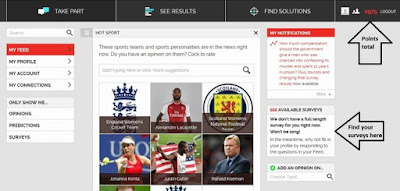
Click image to enlarge


And here is the app screen, showing the survey page. The £ icon on the bottom right takes you to the settings cog wheel. You can also see a survey notification at the top of the phone.


Do I need to check anything else or look for spaceships?

·         Yes! Always check T&Cs and settings on survey sites to make sure there are no surprises.
·         Adjust your privacy level - by default all members can see your anonymous profile feed (see later). On the website, find it in: My Profile > Privacy Level (on the right of the page), and click on 'Invisible'. I've shown this on the picture below. On the app, tap the £ icon at the bottom of the screen, then the cog wheel at the top, go to 'Privacy Level' and select 'Invisible'.
·         Set survey frequency to 'As often as possible'. You have to go to the website for this; it's in My Account (on the menu on the left) > My Settings (look for this on the right of the account page).
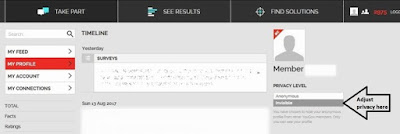
Click image to enlarge


What's this about the profile feed and social?

When you log in, the first thing you see is your Feed. I've shown this in the first picture above. There are lots of unpaid polls here. Some add to your profile and may lead to more surveys, but these ones usually turn up at the end of paid surveys anyway. In general, unpaid is poor value - complete a few useful-looking ones, and move on.

Underneath that is your Profile Feed. As a new member, this is fairly empty, but it'll soon fill up with all your opinions and attitudes once you start completing surveys. Other members can see and follow your anonymous profile feed, unless you make it invisible as suggested earlier.

NOW FOR THE BEST BIT WHEN THE SPACESHIP TURNS UP (Cashing out)

When you get to 5,000 points, you can cash out your well-earned £50. You'll be paid by BACs to your bank account. If you prefer, you can enter monthly prize draws for a chance of winning cash or points.

Look, look! Tips, tips, tips.

·         Be consistent and truthful or you'll be screened out or even banned.
·         Want to earn more? Change your settings to get as many surveys as possible, (see above).
·         You don't have to do every survey, but missing lots means YouGov may send you fewer.
·         Check your profile privacy setting, otherwise members can see some of your views, (see above).
·         The polls in the feed are fun but unpaid - do a few, but spend most of your time elsewhere.
·         And finally - keep your eye on the £50 end goal - it'll be worth it!

This all sounds great - what's the downside?

THERE IS NO SPACESHIP.
Oh, and it might take a few months to get to payout, but keep going because when your £50 arrives it feels more awesome than an actual spaceship, and you can buy chocolate...

Interested?

I make an extra £50 in just a few months, and you can easily do this too, simply by spending a short time every week completing quick, reasonably paid, varied-topic surveys, with none of the frustration of being regularly screened out.

If you found my blog useful, it'd be great if you were to choose to use my referral link to join - thank you if you do, you are awesome and I'd buy you a spaceship if I could.

Sign up on the website or mobile web here: https://yougov.co.uk/refer/Rx-tus5G6l4G3NVodTYkjQ/

I get 200 points after you complete six surveys in return for telling you about the site. Thank you and I hope you enjoy being a member of YouGov.


Jo

Want to be part of a fantastic community of 4000+ members, all there to help you to make the most out of surveys sites and apps like this? Join the Facebook Group now!


Wednesday, 16 August 2017

What's the word on the "Street ......Bees?"

A beginners guide to buzzing, by Rachel Eastop, a member of our Facebook Group dedicated to sites and apps that help you to make money online.

I'm a bit fond of survey app Streetbees. I like the app (android or IOS). It's user friendly and it's pretty. I've been off sick from work for a while following a head whack (another story) so I decided to investigate the wonderful world of online surveys to see if it is possible to actually make some cash. I signed up to lots and lots of sites as a bit of an experiment. I can't remember how I came across Streetbees (see earlier head whack mention ) but I joined up in about the middle of June. What struck me was how different the app is from every other survey site I had encountered. It's conversational. It's also yellow, with bees. Nice :)


The pros and cons - or the honey and the stings - I'm sorry. Had to be done.


Pros/Honey

1. It's a really nice, user friendly app.
2. The surveys are short , a few minutes, plus they are interesting.
3. They pay well. £1 ish for a short survey (5-10) questions)
4. Other surveys pay considerably more, for example £5 for a 10 minute survey with photos. Obviously these survey amounts vary.
5. There isn't a cash out value! You don't have to apply for your money, it gets paid into your PayPal account quickly and automatically following your approved survey. I have had payments on the same day, the longest I have had to wait was following a Friday survey. I received payment the following Tuesday.
6. Helpful and friendly team. Ask, and they answer.
7. Global organisation with high profile clients such as L'oreal, Unilever, Pepsi and Vodafone (to name a few).


Cons.

1. I have found the surveys to be infrequent, it isn't going to be something you can give up work for (but none of them are)
2. Initially I had to complete a number of short unpaid surveys (similar to most sites so don't be disheartened)
3. You don't receive notifications and if you do it's too late (I'll address this at the end)
4. There isn't a clear referral stream if you are looking for passive income. I asked the team and it is project dependent.
5. The apps don't contain all the information they are supposed to such as referral data.


Summary.

It's uncomplicated and pays out without the faff. Infrequent (in my experience) but very competitive rewards. Having said that, it's a reliable return compared to some of the other sites.

My referral link is below which you are under no obligation to use but I'll love you a bit if you do although I don't know what the benefits will be ;)
I'm using Streetbees, and I think you'd love it too! Here's a referral code to get you started: 7886F4 http://onelink.to/streetbees
Lastly - to address the notifications I will be setting up a Whatsapp community group so that if we come across a survey we can let each other know. Obviously they won't be applicable to us all but it may help us to act on them sooner rather than later. If you are interested let me know by pm on Facebook and I will add you.

Hope it works for you. All the best, Rachel. 

Questions about Streetbees? Come and ask Rachel over on our Facebook Group!

Wednesday, 3 May 2017

Prolific - Interesting surveys and an easy moneymaker

One of my newer addictions in the world of survey sites and apps is Prolific and if you're not a member you really should be! The surveys (or studies as they call them) are really interesting and nothing like the usual ones we see on Swagbucks, Mintvine etc, the payments come in quick and fast and the minimum cashout is £5 to either Paypal or Circle.

I did my first study on 8th March 2017 and today is 2nd May 2017 and so far I've made £77.38 with very little effort:


The problem is (or the problem as I see it from comments in our Facebook group) that it's not very intuitive and so people are giving up on it without giving it a chance.

So here's a quick and dirty guide to getting going and making some half decent money in a very decent time.

1) Sign up

Firstly, visit the Prolific website and create an account. IMPORTANT - sign up as a Participant, NOT a Researcher or the rest of what I say here won't make much sense :) 

I'm not going to walk you through signing up and verifying your account as the site does that for you, but if you have any problems, feel free to pop along to our Facebook Group and ask - there's always someone around to help.

2) Complete the prescreening questions

This is the part that most people are missing out on and it's not obvious. In order to be offered studies, you need to have answered some prescreening questions.

On a laptop / PC you'll find the prescreening questions under the Account link


Once you click on that you'll find a whole host of questions to answer - the more you answer, the more likely you are to be given studies to do so it's worth the time it takes - probably about 15 minutes.

On a phone it's under 'Menu' (3 lines top right)


Once you've done this, be sure to check back on that screen every few days to see if you have any new ones to answer - as new studies are added, the criteria may be different to the questions you've already answered, so it's best to always be up to date on these.

3) Check for studies

Now you need to check out the Studies page to see if you're eligible for any. The great thing about Prolific is that you are only offered studies you qualify for so a disqualification is very very rare (it DOES happen occasionally but I've only had it once in 2 months).

At first you're probably going to see this:


Don't give up! Studies come in regularly - if it's the first time you see the screen it might be worth doing the demo study just for some practice.

It'll show you what a study looks like when it comes in:


Click on Start now and see how the study process works, it'll give you practice for later.

4) Keep checking for Studies

A lot of people are expecting that like other survey sites, Prolific will send you an email when a study is available - they won't. It's up to you to keep checking. I have the study page open in a tab on my laptop browser and I periodically refresh it to see if anything is available. On your phone you might have to keep visiting the page.

Here's what a real study looks like:


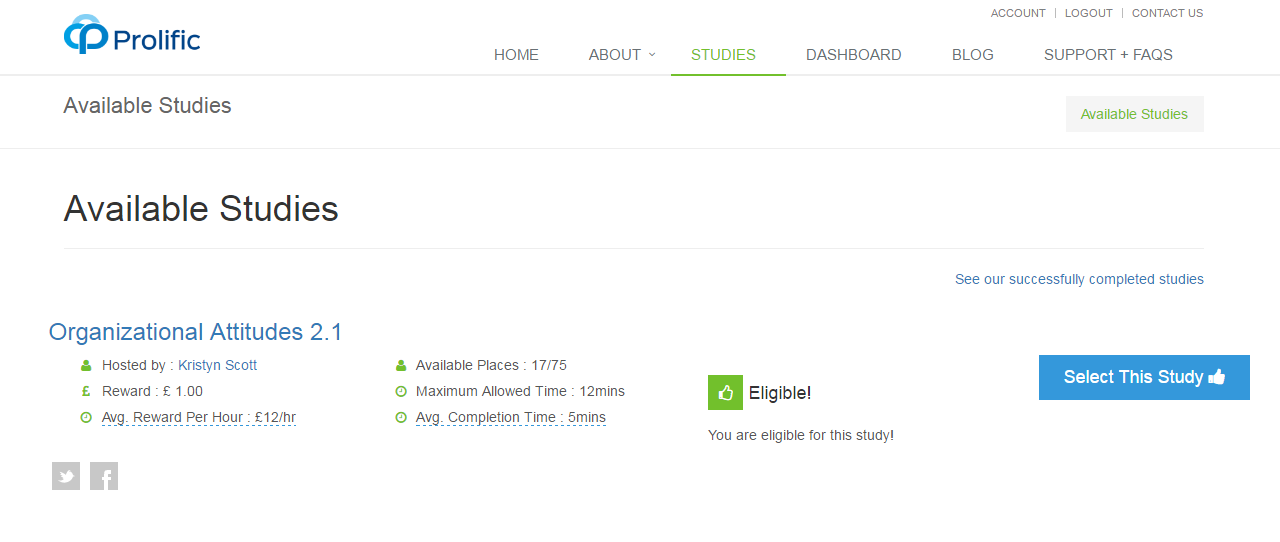
You could see anything from 1 survey a day to 7 or more (my max is 7 in a day). The survey offer will tell you how much it is worth, what that works out at as an hourly rate, how long you have to do it and how long the average person takes to do it. You choose whether you do it or not.

It's a great little earner, pays out really quickly and I wholeheartedly recommend it.

In summary

- Interesting surveys
- Good rates of pay
- Easy Paypal or Circle checkout (Paypal does incur fees, Circle doesn't)
- Remember to complete prescreening
- Remember to check regularly
- Have fun :)


Questions? Come and join our Facebook Group where we talk about Prolific, Swagbucks, Mintvine and many other apps and sites to make money online.


Thursday, 16 February 2017

How do I make money from Mintvine?

I'm a massive fan of Mintvine. It's kind of a rival to Swagbucks, but a lot easier to navigate and there seem to be more surveys available at any one time.

I'm going to presume that you're completely capable of signing up and following the instructions for the initial 'getting to know you' questions (plus I'm being lazy), and that you now have an account and are not sure what to do.

I'll share with you the things that I do if I'm focused enough, each day.

Daily Survey

The easiest way to earn 5 points every day is to do the Daily Survey. Scroll down and you will be given the option to take part (I've done mine already which is why it's already filled in)


There's a new one each day and that's 5 points per day. Time taken: 5 seconds.

Survey Street

The first thing you see, top right of your screen or via the menu, is Survey Street.


The steps are easy:

1) Click on 'Go Take My First Survey' - you'll see something like this:


Scroll down and you'll see you have to agree to a few things before you can take a survey:


You have to tick those 3 boxes before you can proceed

2) Take the survey:


You won't necessarily see the exact screen I have above, but you'll be on your way to your first survey.

Things to know:

  • You may not qualify for every survey 
  • You may have to answer a few questions before you find out you don't qualify
  • Different surveys have different times and different values
You'll be offered other surveys once you've finished one - it's up to you if you do another one or move on to:

Rewards Road

Underneath Survey Street  you should see Rewards Road:


Basically it's just another version of surveys, but each one of these is worth 70 points each. You don't have to agree to anything like before, you just do the surveys.

You'll see this screen once you click on 'Go to Rewards Road':


Click on 'Continue' and you'll get to a screen like this with a few qualifying questions:


Answer the questions and you'll be offered a survey:


As before, you could be disqualified after answering a few questions. Unfortunately that's just the way it is.

These are the main ways to get points on Mintvine. I'll cover some other ways in future blog posts.

Things to note:

  • Points 'pend' for 2 weeks, so while they will show as part of your total, you won't be able to withdraw them until they're approved.
  • Mininum cashout for Mintvine is 1000 points.
  • 1000 points equals $10
  • Once you have 1000 points, you can cashout any amount beyond that, so for example 1264 points will get you $12.64
  • HOWEVER, 1000 points is just £7.49 via Paypal, but £13.10 on Amazon so Amazon cashout is MUCH better!
  • Mintvine takes around 5 days from requesting a cashout to receiving it
If you're not on Mintvine already I'd highly recommend it - unlike Swagbucks and other survey sites there seem to be a LOT more surveys available and if you can qualify for them then the points add up pretty quickly.

If you have any Mintvine questions, post them in the comments below and I'll answer them in future blog posts, or pop over to our Facebook group and join.